Frequently AskedQuestions

When should I repair my pool equipment versus replace it?

If your equipment is relatively new and the issue is minor, a repair is often the most cost-effective option. However, older equipment that breaks down frequently, runs inefficiently, or is no longer supported by the manufacturer is usually better replaced. Our technicians can evaluate your Hayward equipment and recommend the best solution for performance and long-term value.

What are the benefits of upgrading to new pool equipment?

Upgrading to newer Hayward equipment can improve energy efficiency, water quality, and overall pool performance. Modern pumps, heaters, and automation systems often run quieter, use less energy, and offer smart controls—saving money while making pool ownership easier and more enjoyable

Can you help me choose the right Hayward equipment for my pool?

Every pool is different, so we assess your pool size, usage, and existing setup before recommending equipment. Our team helps you select the right pumps, filters, heaters, or automation systems to ensure optimal performance, efficiency, and long-term reliability.

?

general questions

?

water chemistry

?

Liners

?

covers

?

filters

?

Automation

?

pumps

?

heat pumps

?

gas heater

?

salt systems

?

Lights

?

UV2

Coming soon…

Contact Us


admin@excelpoolservice.com

732-905-1300

5420 HWY 9 S. Howell NJ 07731

M-F: 9am-5pm, S-S: Closed

Have More Questions?

4 + 11 =

Excel Pool Service
5420 Rt. 9 South
Howell , NJ 07731
Equipment

Heater & Heat Pumps

Filters

Pump Motor

Lights

Automation Sanitization

DHL 

Services

Liner Replacements

Safety Covers

Warranty

Openings and Closings

Misc Services

Phone

(732) 905-1300

Email

Admin@excelpoolservice.com

Save & Share Cart
Your Shopping Cart will be saved and you'll be given a link. You, or anyone with the link, can use it to retrieve your Cart at any time.
Back Save & Share Cart
Your Shopping Cart will be saved with Product pictures and information, and Cart Totals. Then send it to yourself, or a friend, with a link to retrieve it at any time.
Your cart email sent successfully :)

u

Why does my multiport valve leak out of the backwash line?

  • The valve seat gasket inside of the valve may have become worn or loose. If this is the case, you will need to replace the gasket. With the pump off, remove the cover screws of the valve.
  • NOTE: Mark the top and bottom of the valve with a marking pen. You mustn't change the location of the cover when reassembling. Some newer valves will have a flat spot alongside one of the cover screws. When re-assembling, align the flat spots.  
  • GENTLY remove the old gasket and glue, ensuring the channels are clean and clear. Use 3M adhesive, part number SPX0710Z9, or crazy glue**. Lay a bead of adhesive into the channel where the gasket sits. Place the flat side of the gasket into the channel. Apply pressure to firmly seat the gasket and let dry for 24 hours or contact your Authorized Hayward Dealer for repair.
  • **Crazy Glue – Use caution when using crazy glue. You will have only ONE chance to seat the gasket
u

What does it mean when I see sand in my pool?

Sand in your pool typically means that the lateral assembly in your sand filter is cracked or broken and needs to be replaced. This further means that the sand is coming into the pool through the jets. To confirm this, turn off the pool and leave it off for at least 30 minutes (to allow the sand to “settle” inside the tank of the sand filter). Then, turn the pool on and immediately run to the edge of the pool and watch the jets. If sand is seen coming through the jets right away, then yes, the lateral needs to be replaced.

Sometimes, what may APPEAR to be sand at the bottom of the pool is actually NOT sand. A simple test would be to take your pool brush and brush up against the “sand”. If you are able to push it along the floor of the pool and even get it over to the main drain, then it is, in fact, sand. If, however, it “poofs” up into a cloud as soon as you touch it with your pool brush, then it is NOT sand, but algae, and you would need to chemically treat the water to remove it. 

u

What is the proper way to backwash my filter?

When the filter pressure rises 8 to 10 PSI over the clean starting pressure (as noted on the pressure gauge), it is time to backwash. (You should make sure that  you do the backwashing at least once a week.) Here are the proper steps:

  1. Turn the pump OFF and rotate the multiport valve handle clockwise to the “BACKWASH” setting.
  2. Make sure the backwash hose is secured and stretched out (i.e. not bunched up or coiled, because it may burst when water starts shooting through it).
  3. Turn the pump ON and the dirty water will begin to flow out of the backwash hose.
  4. Watch the valve’s sight glass on the filter. You will see the water flow through it and it will go from clear, to dirty, then back to clear. (This could take approximately 1 minute or less, depending on dirt accumulation.)
  5. Once the water runs clear in the sight glass, turn the pump OFF and rotate the multiport valve’s handle clockwise to the “RINSE” setting.
  6. Turn the pump ON and let run for 20 to 30 seconds or until the water in the sight glass is running clear. This ensures that all dirty water from backwashing is rinsed out of the filter to waste, the plumbing lines are cleaned out, and the sand bed is reset. 
  7. Turn the pump OFF and rotate the multiport valve’s handle clockwise to the “FILTRATION” setting.
  8. Turn the pump ON and allow the system to begin circulating the pool water. Take a reading of this new clean starting pressure so that you have a reference point for the next backwash cycle.
  9. Steps 1 through 6 can be repeated one or more times, as alternating between backwash and rinse will help to dislodge more out of the filter. When the water runs clear in the sight glass, you’re done.

NOTE: Your pool most likely will lose some water during the backwash/rinse process. Therefore, water may need to be added to the pool to replace it. You may also see some sand coming out of the backwash hose during this process. This is normal, as backwashing actually skims a thin layer of sand off the top inside the filter, and this sand layer comes out through the backwash hose.

u

Why should I vacuum to waste?

Vacuuming to waste sends dirt, debris, and heavy contaminants out of the pool entirely, rather than through the filter. This is especially helpful when dealing with algae, fine debris, or cloudy water, which can quickly clog or overwhelm your filter. By bypassing the filter, you prevent buildup, reduce backwashing or cleaning, and help your system recover faster—just keep an eye on the water level, since water is removed during the process.

u

What is the difference between MPV settings?

  • Filter: Normal setting for daily operation; water flows through the filter to remove debris.

  • Backwash: Reverses water flow to clean the filter by flushing debris out.

  • Rinse: Resettles filter media after backwashing and clears dirty water before returning to filter mode.

  • Waste: Sends water out of the pool, bypassing the filter—used for heavy debris or algae.

  • Recirculate: Bypasses the filter but returns water to the pool; useful for circulation without filtration.

  • Closed: Stops all water flow (pump must be off).

Always turn the pump off before changing MPV settings to avoid damage.

u

Why does my filter pressure rise very quickly, even after backwashing?

  • D.E. filters filter the water down to 1-3 microns, every time the water passes through the filter. Maintain a balanced clear pool and this will reduce incidents of rapid pressure rise. One possibility is that the filter grids or Flex tubes are clogged with minerals or oils. You should clean your grids once a year, or season, with a degreaser and if needed an acid bath. Minerals and oils embed themselves in the fabric of the filter and reduce the available surface area used for filtering.
  • If too little DE is added during pre-coat, debris and particles will embed in the fabric. Cleaning with a high-pressure hose, NOT A POWER WASHER, may be needed to remove the grids. If cleaning does not work, then replacement is the only option.
u

sand filters

  • The sand filter tank is round or egg-shaped. The sand contained in the filter strains the impurities from the water as the water passes through the sand. The sand filter uses a multiport valve to direct the water through the filter or out to backwash. The valves are either top or side mount. Both valves work the same way. In the filter position, the water is directed over the top of the sand bed and, as the water flows down through the sand, the sharp edges of the sand catch the particles in the water. The clean water is pushed out of the filter through the bottom lateral assembly. The laterals are in the shape of a wagon wheel, with tiny holes along the top edge to allow clean water back to the pool and to keep the sand and dirt in the filter.
u

Why does my filter run at a high filter pressure and has reduced water flow to the pool?

  • A dirty filter maybe the problem. When the filter pressure rises 8-10 PSI over the clean starting pressure, it is time to backwash or clean the filter
  • If there is algae in the pool, it maybe clogging the filter, keeping the pressure high. The filter cannot kill algae. Contact your Authorized Hayward Dealer for proper chemical applications.
  • If the filter pressure continues to run high with reduced water flow to the pool, the pump may be moving more water than the filter is designed to handle. Check the flow ratings of both the pump and filter to ensure they are sized correctly.
  • You may have a blocked or plugged return line. Contact your local Hayward dealer for service.
u

Why is the filter continuing to run at high pressure even after backwashing?

  • Make sure you are following the instructions in your Hayward owner’s manual. The sand bed may be clogged with mineral deposits or other material that will not backwash away.  Some calcium-based chlorines and other alternative sanitizers could cause a build-up in your sand bed. You may need to change the sand.
  • Before you change the sand in your filter, try removing approximately 1” of the top layer of sand, and replace it with the exact amount of sand removed.   This sometimes rids the sand bed of the deposits clogging the filter.
  • You may have to clean your filter system with a special filter cleaner. Check with your Authorized Hayward dealer for proper procedures.
  • Check to see if there is a closed or partially closed valve on the return piping.
  • Your pump may be too small to provide sufficient flow for proper backwashing.  Your filter will filter properly, but if your pump does not supply at least 60% of the filter’s designed flow rate, your filter will never backwash completely.  Refer to the label on your filter for flow rate requirements.  It may be necessary to upgrade the pump or downgrade the filter.
  • Your pump may also be exceeding the maximum allowed flow rate of your filter, causing excessive backpressure. Check your Hayward filter owner's guide or the operations label on your filter for the maximum allowed flow rate.  You may have to downsize the impeller or pump to a lower horsepower or change the filter for one that will accommodate the pump’s flow rate.  If allowed to continue, a pump that exceeds the recommended flow rate of a sand filter could cause the sand bed to channel (small channels in the sand that allow debris to pass unfiltered).  This would cause debris to bypass the filter. 
u

Why does my pressure gauge never move?

The pressure gauge will show a reading when water passes through the valve or filter, depending on the gauge’s location. If the gauge remains at zero (0) when the pump is running, or if it stays at the same pressure whether the pump is operating or not, the gauge is broken and needs to be replaced.

u

When do I need to replace my sand?

On average, sand should be replaced every 3 to 5 years. This may be longer if the pool stays clear, or shorter if the filter runs all the time. The jagged edges of the sand wear down and become smooth as the sand ages. When this happens, the sand can no longer trap debris particles and dirt can pass through the sand and back into the pool.

If the pool is chemically balanced, the system is running the proper length of time, and the bather load is normal, but the water will not clear even when using a flocculant or clarifier, then the sand needs changing.

As the sand ages, it may start to clump and the water flow can form channels in the sand, allowing the debris to pass through. Channeling is often seen when the pump horsepower is too large and wants to move too much water through the filter.

NOTE: As a matter of practice, we always replace the lateral assembly in the filter whenever we change the sand. Over time, the plastic laterals can become brittle (from pressure, etc.). When pouring new sand over them during the replacement procedure, sometimes they can crack or break, and so we put new laterals. So we ALWAYS recommend replacing the lateral assembly whenever you change the sand in the filter. 

u

DE Filters

  • The Diatomaceous Earth (DE) filter contains filter elements that are either curved grids or Flex tubes (long finger-like tubes). They are covered in a fabric on which the DE forms a coating. The DE acts as a filter by permitting water to filter through the DE and leave the impurities behind. The DE filter has the ability to filter out microscopic particles.
u

Alkalinity and pH:

Alkalinity controls your pH levels, and keeps them properly locked in place. Perfect Alkalinity is an 80.

Safe/neutral pH is a 7… anywhere between 7.2 to 7.8 is preferred. Perfect pH is a 7.4. Anything under 7 is considered unsafe.

Your Alkalinity Increasing and pH Increasing/Decreasing chemicals can be added within the same day, just not at the same time. Please allow 4-6 hrs. between both types of products for your pool to properly filter the chemicals. *** Remember, even if the water is clear, you should still allow a minimum of 4 hours for the Alkalinity to filter before adding any pH increasers/decreasing agents.

Pool Grade Alkalinity Increasers may be broadcast into the pool, preferably in front of returns that are located in your deep end, to help disperse chemicals more thoroughly.

You should always dilute any pH increasers or decreasing agents into a large bucket. We recommend filling a 5-gallon bucket ½ – ¾ full and adding your dry chemicals to the bucket slowly. Completely mix the dry chemicals and water with a wooden spoon or wooden stirrer until completely dissolved, leaving no lumps. Once everything is completely dissolved, slowly walk around the edges of the pool, adding the mixture to the pool water, taking care to add the majority in front of the returns, and avoiding the skimmers, to disperse the chemicals more thoroughly.

If you have a salt system and if the phosphate count is 300 or higher, DO NOT SUPERCHLORINATE, as you will burn out the cell. Instead, follow these steps:

Add PhosFree, circulate the pool for 24 hrs (+ or -, depending on how bad of an issue you have).
Turn the salt system OFF, pour five to six pounds of shock into the pool, and then wait 24 hours. (NOTE: It is always best to dilute powdered shock into a five-pound bucket of water, and then either pour it directly into the pool or into the skimmer closest to the filter.)
Turn the salt system back on AUTO.

Disclaimer: It is safe to swim in your water 8 hours after any Alkalinity or pH changes

u

Calcium Hardness:

Calcium Hardness is often overlooked, but is a necessary addition. It “hardens the water” because soft water is generally classified as corrosive.

It will not do any damage to you, so please do not panic, but in order to protect your plumbing, liner, and equipment throughout the season (since they are all under pressure with water constantly flowing through them), you will want your Calcium Hardness level to be a minimum of 200, with 300ppm being ideal.

*** Always add your Calcium Hardness agent a minimum of 24 hours after Alkalinity and pH products. Failing to do so might cloud your pool water excessively. ***

Calcium Hardness increasers usually generate heat when coming in contact with water, so please exercise caution when adding these chemicals to the water’s surface. It should always be broadcast into the pool slowly and never prediluted!!! Always follow the directions on the packaging, and never exceed chemical dosages from packaging so as to protect your liner, and so as to not over cloud your pool water.

Disclaimer: It is safe to swim in your water 8 hours after any Calcium Hardness increases.

u

Cyanuric Acid

Many brands offer liquid and a pelleted versions of Cyanuric Acid – otherwise known as CyA, Stabilizer, or Conditioner – all of which act as a “sunblock” for your chlorine, keeping it working and active. The ideal range for a chlorine pool is 30-90ppm, with 90ppm being on the high side.

Please remember that chlorine tabs often contain stabilizer which will add to this count throughout the season. For a salt pool, liquid CYA is safest for the salt cell and should be between 60 and 80 ppm to ensure your salt cell is not over working itself.

Cyanuric Acid should always be added a minimum of 24 hours after any Calcium Hardness products, with 48 hours being ideal, to ensure they do not cloud the water and work most efficiently. Though you will see that the pelleted version of Cyanuric acid may be more cost friendly than the premixed liquid, if you own a salt system, please do not risk it! The pelleted chemicals often times do not dissolve completely and can find themselves scaling prematurely, causing issues later on.

The pelleted or granular version of Cyanuric acid must be made into a slurry before being added to the skimmer. We recommend wearing goggles, and gloves, and using a skimmer sock, as well as a wooden spoon or stirrer, and a 5-gallon bucket. Follow the chemical dosing from the back of the packaging, and create a slurry using warm water. You may have to stir this mixture for upwards of one (1) hour before it is ready. Once you achieve a mainly liquid texture, you can then slowly, and carefully, pour the mixture into the skimmer that has been equipped with the skimmer sock.

Or, the easier and more recommended route would be to use the prediluted liquid Cyanuric acid. After obtaining a water test, and calculating how much you will need based on your gallonage, follow the directions on the packaging. Most packaging states you will need to shake the gallon for approximately one minute, then slowly add ½ gallon to the pool skimmer, while slowly walking around the edge of the pool and adding the rest of the gallon. Once the gallon is empty, fill the empty gallon with pool water, shake again, and empty out the contents to ensure you got all the product.

Disclaimer: It is safe to swim in your water 8 hours after any cyanuric acid increases

u

Phosphate Reducers and Enzyme Blends

Phosphates are organic compounds derived from phosphoric acid. They are present in a multitude of things, ranging from environmental attributes: leaves, pollen, grass, flowers, dirt, sand, rain water; to human based attributes: hair cells, skin cells, urine, fecal matter, hair products, detergents, sunblock, etc. Essentially, they are a food source for algae. They will not do you any harm, and you cannot even see them, however, it is essential to your pool that you remove them as much as you can. The best way to do this is through the use of enzyme blends.

Disclaimers: Any Phosphate Reducers or Enzyme blends should be added a minimum of 72 hours after any Cyanuric acid to ensure the live enzymes have the best chance to thrive. IT IS NOT RECOMMENDED TO SWIM FOR 24 HOURS AFTER ADDING LIVE ENZYMES TO POOL WATER.

ALWAYS FOLLOW THE DIRECTIONS ON THE CHEMICAL PACKAGING, AND NEVER USE ANY CHEMICALS THAT MAY HAVE GOTTEN WET OR DAMAGED IN TRANSPORT!!!

It is very important to maintain proper water chemistry to protect not only your pool equipment, but your liner, your concrete, your handrails, and yourselves!

u

What are Nitrates & how do I treat them?

Nitrates are dissolved nutrients that enter your pool from rainwater, fertilizers, leaves, dirt, and swimmer waste. Like phosphates, nitrates feed algae, but unlike phosphates, they cannot be filtered or removed with chemicals.

How do I treat nitrates?
The only effective way to lower nitrates is by partially draining and refilling the pool with fresh water to dilute their concentration. Once levels are reduced, re-balance your water chemistry.

How do I prevent nitrates?
Keep debris out of the pool, avoid fertilizer runoff near the pool, maintain proper sanitizer levels, and open and close the pool at the right times. Using a safety cover and maintaining clean water year-round helps minimize nitrate buildup.

u

BASIC POOL CHEMISTRY - MINERAL

Mineral sanitizers are an alternative form of sanitizer used in pools today. They use minerals such as copper and zinc to purify water in much the same way river rock does in lakes and streams. This type of system uses less chlorine than normally required because the minerals perform 90 percent of the sanitizing. You would still need chlorine or bromine as a “partner” sanitizer because the minerals only work when water flows through them. When the filter is off, the small amount of chlorine in the water continues the sanitizing started by the minerals, keeping your pool clean and clear.

Maintaining proper chemistry is as essential with mineral systems as it is for chlorine systems. King Technologies, makers of the FROG Mineral System, require that the chemistry be maintained as follows:

Free Chlorine 0.5 – 1 PPM
pH 7.2 – 7.6 PPM
Total Alkalinity 80 – 120 PPM
Calcium Hardness 150 – 400 PPM
Cyanuric Acid 30 – 50 PPM

If the pH falls below range, you can adjust it by adding a pH increaser. Reversely, if the pH is too high, lower it with a pH reducer. Total Alkalinity is handled in much the same way, except you would use an alkalinity increaser to increase the alkalinity level. If the Calcium Hardness level falls low, add calcium hardness increaser (calcium chloride). If the Calcium level is too high, simply dilute it by draining some water and adding fresh water to replace it. It’s recommended that a copper based algaecide be used with this system as well. Copper based algaecides can last in the water for up to 3 months, continuously killing bacteria and algae.

Baquacil
Baquacil (or Revacil, if you’re nasty) is a non-chlorine alternative sanitizer. This sanitizer is peroxide based, using hydrogen peroxide to shock and activate the sanitizer. This is the same hydrogen peroxide that you would use to clean and disinfect wounds. This sanitizer is good at keeping an algae free pool due to the peroxide used. Simply maintain the sanitizer level between 30-50 PPM by testing and adding weekly doses of the sanitizer. To keep the sanitizer active and strong, monthly additions of hydrogen peroxide shock are required to keep a level of 50-100 PPM. Algaecide is added bi-weekly to help keep algae at bay.

Baquacil has become an expensive sanitizer system to maintain. It’s appeal has reduced as a result as well due to new and more viable technology, such as mineral and salt systems becoming introduced. As the technology for these systems improves, Baquacil is becoming a dying breed.

u

What type of shock is best for me?

The best shock depends on your pool type, water condition, and goals. Non-chlorine shock is ideal for routine maintenance, cloudy water, and salt systems because it won’t raise chlorine levels or cause staining. Calcium hypochlorite (chlorine shock) is best for killing algae and heavy contamination but can increase calcium and risk staining if water chemistry isn’t balanced. Dichlor shock dissolves quickly and is good for regular use but adds stabilizer, which should be monitored. If metals or staining are a concern, a non-chlorine shock is usually the safest option.

u

How often should I shock my pool?

Most pools should be shocked every 1–2 weeks during swim season, or as needed after heavy use, rainstorms, or if the water becomes cloudy or algae begins to form. Regular shocking helps break down contaminants, restore sanitizer effectiveness, and keep your water clear and healthy.

KEEP IN MIND...

Shocking your pool can sometimes cause or worsen staining, especially if your water contains metals like iron or copper. When chlorine levels spike, these metals can oxidize and deposit onto the liner or pool surfaces. To help prevent staining, maintain balanced water chemistry, use a metal sequestrant if metals are present, and avoid shocking when pH or alkalinity levels are out of range. If staining does occur, professional stain treatments may help reduce its appearance.

u

I have a salt system; Do I need to shock my pool? How do I shock my pool with a salt system?

Yes, even with a saltwater system, occasional shocking is recommended. While the salt chlorine generator produces chlorine continuously, shocking helps eliminate built-up contaminants, chloramines, and algae after heavy use, storms, or cloudy water.

To shock a salt pool, use a non-chlorine shock or a salt-system-safe chlorine shock as needed. Always balance your water first—especially pH—then add the shock with the pump running, preferably in the evening. Avoid super-chlorinating too often, as it can shorten the life of the salt cell.

u

What is Algae? How do I treat it & prevent it?

Algae is a plant-like organism that grows in pools when water chemistry, circulation, or sanitation is unbalanced. It commonly appears as green, yellow, or black discoloration on pool surfaces and can make the water cloudy or slippery.

How to treat algae:
Brush affected areas, shock the pool with the appropriate chlorine level, and run the filter continuously until the water clears. In some cases, algaecide may be used as a follow-up treatment.

How to prevent algae:
Maintain proper water chemistry, ensure good circulation and filtration, clean debris regularly, and avoid letting chlorine levels drop too low. Using a safety cover during the off-season and opening the pool early also helps limit algae growth.

u

There are stains on my pool walls – How did they occur & how can I treat and prevent them?

Pool wall stains are commonly caused by metals in the water (such as iron or copper), organic debris like leaves and algae, chemical imbalances, or improper shocking. Metals can oxidize and attach to pool surfaces, while organic material can leave discoloration if not removed promptly.

How to treat stains:
Identify the stain type first. Metal stains may be reduced with stain removers and metal sequestrants, while organic stains often respond to brushing and proper shocking. Severe or long-standing stains may require professional treatment.

How to prevent stains:
Maintain balanced water chemistry, use a metal sequestrant if metals are present, brush surfaces regularly, and avoid shocking when pH and alkalinity are out of range. Keeping debris out of the pool and using a quality cover also helps prevent staining.

u

How important is water chemistry?

Pool water chemistry, along with proper filtration, is the key to clean healthy water. It doesn’t matter if you have 100 or 1,000,000 gallons of water in your pool, the same balance levels and chemical types are required—only the quantity will vary. Everything that enters the body of water affects water balance: swimmers, rain, pollution, animals and chemicals.

If the water is not properly maintained and the pH, Total Alkalinity and Calcium Hardness are allowed to fall below the recommended levels, the water will turn corrosive and can etch plaster, wrinkle vinyl liners, irritate the eyes and skin, AND corrode any metal components in the filtration system. The effects of this are most noticeable when a heater begins to leak. The corrosive water will eat at the copper in the heater’s heat exchanger. The copper will dissolve into the water and blond hair will start turning green and you may begin to see stains on the pool walls.

Each season, every pool creates its own demand for different chemicals. The pool in your neighbor’s yard, with the same system and environment, may react totally different than your own. Every pool also develops a pattern each season. After observing how your pool reacts to different bather levels, rain, and the environment, you will get a handle on your pool’s chemistry pattern and what is required to keep the water balanced.

Please visit our retail store and water testing station for more details on maintaining a chemically-balanced pool or spa.

O
P
Guide to Basic Pool Chemistry

P

.Pool Chemistry is the backbone of owning and caring for your pool. In order to keep yourself and your loved ones safe, you’ve got to do a little studying, and a little homework in order to get things right. Don’t worry! We’re here to help!

First, let’s start with the basics. Bring your water in to your local pool supply store for a water test at least every 2 weeks! There, they will run a variety of tests for you, and they will give you recommendations of what chemicals and what dosages you will need to add in order to balance your water to keep it safe and sanitary.

Your local pool supply store will need a fresh water sample (less than 1 hour old, in a noncontaminated container) and they will need to know the gallonage of your pool. Don’t know the gallonage of your pool? Check out our FAQ page for more info on that!

Here are the usual tests that are performed…

Test Performed Range
Free Chlorine / FAC
(free, active chlorine)
1 – 4 ppm
Total Chlorine / TAC
(inactive/burnt off and active chlorine combined)
*should match your FAC
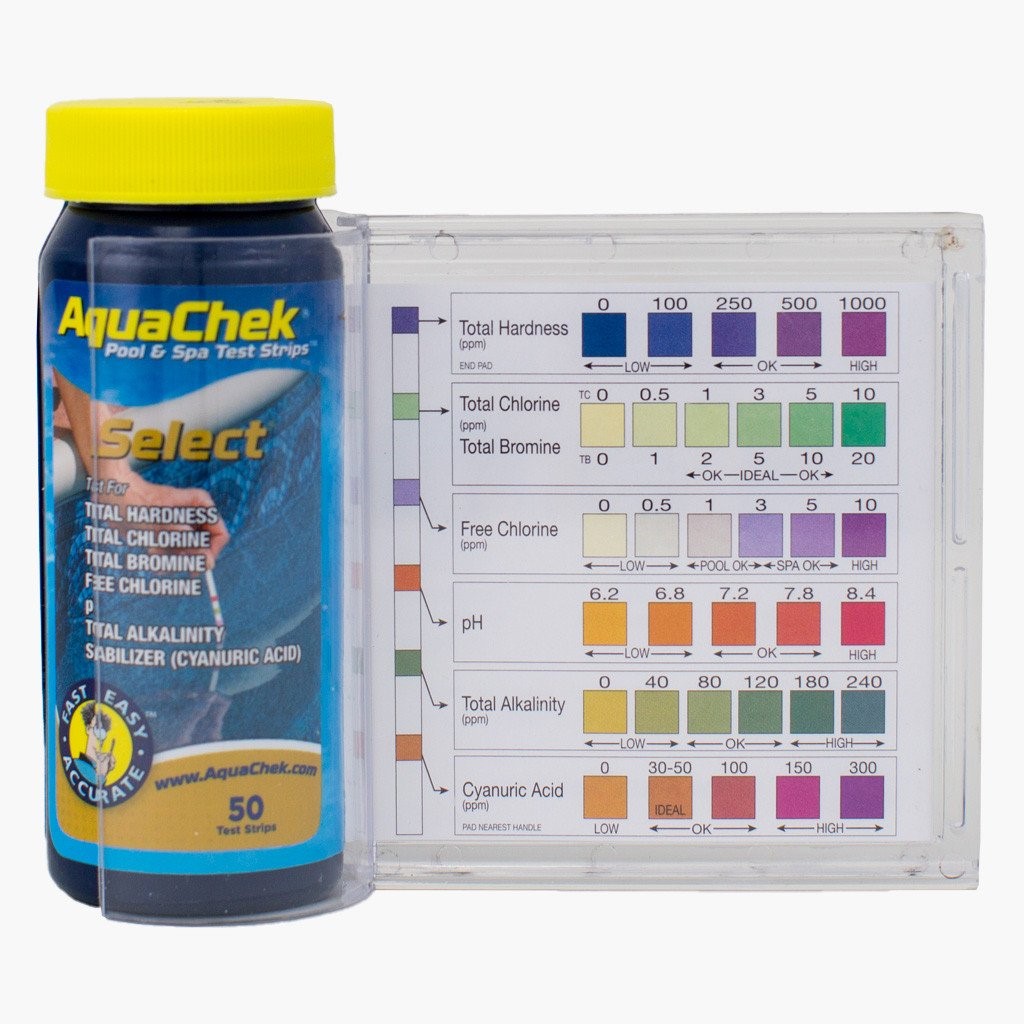
pH (overall acidity of water) 7.2 – 7.8
Total Alkalinity
(controls the pH)
80 – 120 ppm
Calcium Hardness
(aids in water clarity and protects your liner/equipment)
200 – 400 ppm for chlorine pools
300 – 400 ppm for salt pools
Cyanuric Acid / CYA
(protects chlorine from burning off)
30 – 90 ppm for chlorine pools
60 – 90 ppm for salt pools
Phosphates
(food source for algae, made from organic matter)
*** as close to 0 as possible; otherwise, under 100 ppb ***
Total Dissolved Solids (TDS) In a chlorine pool, you test for TDS,
it should be under 1500 ppm
Salt In a salt pool, it should range from 2800 – 3400
Nitrates
(inorganic compounds found in decaying matter)
Should be 0
Iron 0 ppm
Copper 0 ppm


Correct sequence of adding chemicals when making adjustments, if/when necessary:

Shock
Alkalinity
pH
Calcium Hardness
Cyanuric Acid
Salt (*** ONLY IF IT IS A SALT POOL; OTHERWISE, GO TO STEP 7.)
Phosphate Reducers & Enzyme blends


aul to answer

u

Why is my liner floating, what do i do?

A pool liner floats when water builds up behind it—most often due to high groundwater after heavy rain, draining the pool too low, or poor drainage around the pool. This trapped water pushes the liner upward, causing wrinkles or bubbles. For newer liners, majority of the time the liner will fall back into place once the water behind the liner drains itsself out after a few days. If your liner is on the older side you might want to consider replacing it with a new one.

u

I have wrinkles in my liner, how do we fix it?

Wrinkles are usually caused by water getting behind the liner, temperature changes, or liner movement over time. The fix depends on the severity: minor wrinkles can sometimes be smoothed by repositioning the liner, while more significant issues may require lowering the water level, removing trapped water, and re-tucking or resetting the liner. In some cases, liner lock may be used to secure the liner and prevent future movement. A professional evaluation ensures the liner is corrected without stretching or damage.

u

My liner is fading/staining, how do we correct this?

Liner fading and staining are commonly caused by chemical imbalances, metals in the water, prolonged sun exposure, aging vinyl, or algae growing underneath the liner. While some surface stains may be reduced with professional cleaning or targeted stain treatments, fading is permanent and cannot be reversed. Using a safety cover helps block sunlight and debris, which reduces algae growth during the off-season. If discoloration is severe or algae is trapped beneath the liner, resetting or replacing the liner may be the best solution. Proper water chemistry and circulation help prevent future issues.

u

Why does my liner need continuous tucks?

Continuous tucks are needed to keep the liner securely locked into the pool’s track and evenly supported along the entire perimeter. Over time, temperature changes, water movement, and natural liner expansion can cause sections to loosen. Continuous tucking prevents slipping, reduces wrinkles, and helps maintain a smooth fit—protecting the liner and extending its lifespan. If this is a presistance issue, you might want to consider getting liner lock.

Liner lock is a flexible plastic strip inserted into the liner track to hold a vinyl liner firmly in place. Liner lock helps secure the liner, reduce movement, and prevent future slipping—often extending the life of the liner without needing immediate replacement.

u

There are divots in my pool, why did they form and how do I fix them?

Divots usually form when the material beneath the liner settles, washes out, or becomes uneven—often due to groundwater, leaks, or normal ground movement over time. This creates low spots that show through the liner. Fixing divots typically requires partially lowering the water, pulling back the liner, repairing and re-leveling the base material, and then resetting the liner. Addressing the underlying cause is key to preventing them from returning.

u

What is the difference between a waterbag Cover and a safety cover?

A water-bag cover (tarp cover) is a standard winter cover that sits on the water’s surface and is held in place by water-filled bags. It helps keep out debris but does not support weight and requires regular maintenance to remove water and leaves.

A safety cover is a reinforced mesh or solid cover anchored into the pool deck. It is designed to support the weight of people or pets, provides greater protection, allows for easier winter maintenance, and helps reduce debris and algae growth. Safety covers offer superior durability, safety, and long-term value.

u

What are some benefits of safety covers?

Safety covers provide superior protection by supporting the weight of people and pets, helping prevent accidental falls into the pool. They keep out leaves and debris, reduce algae growth by limiting sunlight, and make spring openings easier and cleaner. Safety covers are durable, secure, and low-maintenance, offering peace of mind and long-term value during the off-season.

u

What is the difference between the mesh and Solid covers?

A mesh safety cover allows rain and snowmelt to drain through while keeping most leaves and debris out. It’s lightweight, low-maintenance, and prevents standing water, though some fine debris and sunlight can pass through.

A solid safety cover blocks all sunlight and debris, helping reduce algae growth and keep the pool cleaner at opening. Because it does not drain, a cover pump is required to remove standing water.

A solid cover with a mesh drain opening (Solid MDO) combines both benefits—blocking sunlight and debris like a solid cover while allowing water to drain through the mesh panel (usually one panel in the center of the pool), eliminating the need for a pump. It offers excellent cleanliness with reduced maintenance.

u

Why does my multiport valve leak out of the backwash line?

  • The valve seat gasket inside of the valve may have become worn or loose. If this is the case, you will need to replace the gasket. With the pump off, remove the cover screws of the valve.
  • NOTE: Mark the top and bottom of the valve with a marking pen. You mustn't change the location of the cover when reassembling. Some newer valves will have a flat spot alongside one of the cover screws. When re-assembling, align the flat spots.  
  • GENTLY remove the old gasket and glue, ensuring the channels are clean and clear. Use 3M adhesive, part number SPX0710Z9, or crazy glue**. Lay a bead of adhesive into the channel where the gasket sits. Place the flat side of the gasket into the channel. Apply pressure to firmly seat the gasket and let dry for 24 hours or contact your Authorized Hayward Dealer for repair.
  • **Crazy Glue – Use caution when using crazy glue. You will have only ONE chance to seat the gasket
u

What does it mean when I see sand in my pool?

Sand in your pool typically means that the lateral assembly in your sand filter is cracked or broken and needs to be replaced. This further means that the sand is coming into the pool through the jets. To confirm this, turn off the pool and leave it off for at least 30 minutes (to allow the sand to “settle” inside the tank of the sand filter). Then, turn the pool on and immediately run to the edge of the pool and watch the jets. If sand is seen coming through the jets right away, then yes, the lateral needs to be replaced.

Sometimes, what may APPEAR to be sand at the bottom of the pool is actually NOT sand. A simple test would be to take your pool brush and brush up against the “sand”. If you are able to push it along the floor of the pool and even get it over to the main drain, then it is, in fact, sand. If, however, it “poofs” up into a cloud as soon as you touch it with your pool brush, then it is NOT sand, but algae, and you would need to chemically treat the water to remove it. 

u

What is the proper way to backwash my filter?

When the filter pressure rises 8 to 10 PSI over the clean starting pressure (as noted on the pressure gauge), it is time to backwash. (You should make sure that  you do the backwashing at least once a week.) Here are the proper steps:

  1. Turn the pump OFF and rotate the multiport valve handle clockwise to the “BACKWASH” setting.
  2. Make sure the backwash hose is secured and stretched out (i.e. not bunched up or coiled, because it may burst when water starts shooting through it).
  3. Turn the pump ON and the dirty water will begin to flow out of the backwash hose.
  4. Watch the valve’s sight glass on the filter. You will see the water flow through it and it will go from clear, to dirty, then back to clear. (This could take approximately 1 minute or less, depending on dirt accumulation.)
  5. Once the water runs clear in the sight glass, turn the pump OFF and rotate the multiport valve’s handle clockwise to the “RINSE” setting.
  6. Turn the pump ON and let run for 20 to 30 seconds or until the water in the sight glass is running clear. This ensures that all dirty water from backwashing is rinsed out of the filter to waste, the plumbing lines are cleaned out, and the sand bed is reset. 
  7. Turn the pump OFF and rotate the multiport valve’s handle clockwise to the “FILTRATION” setting.
  8. Turn the pump ON and allow the system to begin circulating the pool water. Take a reading of this new clean starting pressure so that you have a reference point for the next backwash cycle.
  9. Steps 1 through 6 can be repeated one or more times, as alternating between backwash and rinse will help to dislodge more out of the filter. When the water runs clear in the sight glass, you’re done.

NOTE: Your pool most likely will lose some water during the backwash/rinse process. Therefore, water may need to be added to the pool to replace it. You may also see some sand coming out of the backwash hose during this process. This is normal, as backwashing actually skims a thin layer of sand off the top inside the filter, and this sand layer comes out through the backwash hose.

u

Why should I vacuum to waste?

Vacuuming to waste sends dirt, debris, and heavy contaminants out of the pool entirely, rather than through the filter. This is especially helpful when dealing with algae, fine debris, or cloudy water, which can quickly clog or overwhelm your filter. By bypassing the filter, you prevent buildup, reduce backwashing or cleaning, and help your system recover faster—just keep an eye on the water level, since water is removed during the process.

u

What is the difference between MPV settings?

  • Filter: Normal setting for daily operation; water flows through the filter to remove debris.

  • Backwash: Reverses water flow to clean the filter by flushing debris out.

  • Rinse: Resettles filter media after backwashing and clears dirty water before returning to filter mode.

  • Waste: Sends water out of the pool, bypassing the filter—used for heavy debris or algae.

  • Recirculate: Bypasses the filter but returns water to the pool; useful for circulation without filtration.

  • Closed: Stops all water flow (pump must be off).

Always turn the pump off before changing MPV settings to avoid damage.

u

Why does my filter pressure rise very quickly, even after backwashing?

  • D.E. filters filter the water down to 1-3 microns, every time the water passes through the filter. Maintain a balanced clear pool and this will reduce incidents of rapid pressure rise. One possibility is that the filter grids or Flex tubes are clogged with minerals or oils. You should clean your grids once a year, or season, with a degreaser and if needed an acid bath. Minerals and oils embed themselves in the fabric of the filter and reduce the available surface area used for filtering.
  • If too little DE is added during pre-coat, debris and particles will embed in the fabric. Cleaning with a high-pressure hose, NOT A POWER WASHER, may be needed to remove the grids. If cleaning does not work, then replacement is the only option.
u

sand filters

  • The sand filter tank is round or egg-shaped. The sand contained in the filter strains the impurities from the water as the water passes through the sand. The sand filter uses a multiport valve to direct the water through the filter or out to backwash. The valves are either top or side mount. Both valves work the same way. In the filter position, the water is directed over the top of the sand bed and, as the water flows down through the sand, the sharp edges of the sand catch the particles in the water. The clean water is pushed out of the filter through the bottom lateral assembly. The laterals are in the shape of a wagon wheel, with tiny holes along the top edge to allow clean water back to the pool and to keep the sand and dirt in the filter.
u

Why does my filter run at a high filter pressure and has reduced water flow to the pool?

  • A dirty filter maybe the problem. When the filter pressure rises 8-10 PSI over the clean starting pressure, it is time to backwash or clean the filter
  • If there is algae in the pool, it maybe clogging the filter, keeping the pressure high. The filter cannot kill algae. Contact your Authorized Hayward Dealer for proper chemical applications.
  • If the filter pressure continues to run high with reduced water flow to the pool, the pump may be moving more water than the filter is designed to handle. Check the flow ratings of both the pump and filter to ensure they are sized correctly.
  • You may have a blocked or plugged return line. Contact your local Hayward dealer for service.
u

Why is the filter continuing to run at high pressure even after backwashing?

  • Make sure you are following the instructions in your Hayward owner’s manual. The sand bed may be clogged with mineral deposits or other material that will not backwash away.  Some calcium-based chlorines and other alternative sanitizers could cause a build-up in your sand bed. You may need to change the sand.
  • Before you change the sand in your filter, try removing approximately 1” of the top layer of sand, and replace it with the exact amount of sand removed.   This sometimes rids the sand bed of the deposits clogging the filter.
  • You may have to clean your filter system with a special filter cleaner. Check with your Authorized Hayward dealer for proper procedures.
  • Check to see if there is a closed or partially closed valve on the return piping.
  • Your pump may be too small to provide sufficient flow for proper backwashing.  Your filter will filter properly, but if your pump does not supply at least 60% of the filter’s designed flow rate, your filter will never backwash completely.  Refer to the label on your filter for flow rate requirements.  It may be necessary to upgrade the pump or downgrade the filter.
  • Your pump may also be exceeding the maximum allowed flow rate of your filter, causing excessive backpressure. Check your Hayward filter owner's guide or the operations label on your filter for the maximum allowed flow rate.  You may have to downsize the impeller or pump to a lower horsepower or change the filter for one that will accommodate the pump’s flow rate.  If allowed to continue, a pump that exceeds the recommended flow rate of a sand filter could cause the sand bed to channel (small channels in the sand that allow debris to pass unfiltered).  This would cause debris to bypass the filter. 
u

Why does my pressure gauge never move?

The pressure gauge will show a reading when water passes through the valve or filter, depending on the gauge’s location. If the gauge remains at zero (0) when the pump is running, or if it stays at the same pressure whether the pump is operating or not, the gauge is broken and needs to be replaced.

u

When do I need to replace my sand?

On average, sand should be replaced every 3 to 5 years. This may be longer if the pool stays clear, or shorter if the filter runs all the time. The jagged edges of the sand wear down and become smooth as the sand ages. When this happens, the sand can no longer trap debris particles and dirt can pass through the sand and back into the pool.

If the pool is chemically balanced, the system is running the proper length of time, and the bather load is normal, but the water will not clear even when using a flocculant or clarifier, then the sand needs changing.

As the sand ages, it may start to clump and the water flow can form channels in the sand, allowing the debris to pass through. Channeling is often seen when the pump horsepower is too large and wants to move too much water through the filter.

NOTE: As a matter of practice, we always replace the lateral assembly in the filter whenever we change the sand. Over time, the plastic laterals can become brittle (from pressure, etc.). When pouring new sand over them during the replacement procedure, sometimes they can crack or break, and so we put new laterals. So we ALWAYS recommend replacing the lateral assembly whenever you change the sand in the filter. 

u

DE Filters

  • The Diatomaceous Earth (DE) filter contains filter elements that are either curved grids or Flex tubes (long finger-like tubes). They are covered in a fabric on which the DE forms a coating. The DE acts as a filter by permitting water to filter through the DE and leave the impurities behind. The DE filter has the ability to filter out microscopic particles.
u

What is Automation? How does it work?

Pool automation is a system that allows you to control and monitor your pool equipment from one place, often through a mobile app or touchscreen panel. With automation, you can manage your pump, heater, salt system, lights, and valves without manually adjusting each piece of equipment.

Systems like Hayward Omni use a central control unit (such as an OmniHub or OmniPL) that connects to your equipment. You set schedules, temperatures, and on/off commands, and the system automatically runs everything together. For example, when the heater turns on, the automation can increase pump speed automatically to ensure proper flow.

Automation improves convenience, efficiency, and consistency, helping your pool run smarter while reducing manual work and energy waste.

u

How do I add Automation to my pool?

Adding pool automation starts with installing a central control system, such as Hayward Omni. The automation panel is connected to your existing equipment—like your pump, heater, salt system, lights, and valves—so everything can be controlled from one interface or mobile app.

Depending on your setup, automation can be added to an existing pool using an OmniHub or OmniPL system, or by upgrading older controls. Once installed, schedules, temperatures, and settings are programmed so your equipment works together automatically.

For proper compatibility, wiring, and setup, automation should be installed and configured by Excel Pool Service to ensure safe operation and full functionality.

u

Quick Overview of programming the system

Sed ut perspiciatis unde omnis iste natus error sit voluptatem accusantium doloremque laudantium, totam rem aperiam, eaque ipsa quae ab illo inventore veritatis et quasi architecto beatae vitae dicta sunt explicabo. Sed ut perspiciatis unde omnis iste natus error sit voluptatem accusant

u

My Automation system is not connecting to my WIFI, what does that mean and how do I fix it?

If your Hayward Omni system won’t connect to Wi-Fi, it usually means there’s a network, signal, or setup issue, not a problem with pool equipment operation. The pool will still run on its last saved schedule, but remote app control won’t work until Wi-Fi is restored.

Common causes & fixes:

  • Weak signal at the pad: Omni systems require a strong 2.4 GHz Wi-Fi signal. Try moving your router closer or adding a Wi-Fi extender.
  • Wrong network: Omni does not connect to 5 GHz networks—confirm your phone and system are on 2.4 GHz during setup.
  • Password or network change: Re-enter Wi-Fi credentials if your router name or password changed.
  • Power reset: Power-cycle the router and the Omni control panel, then retry setup.
  • Firmware/app update: Make sure the Omni app and system firmware are up to date.

If the system still won’t connect after these steps, the antenna, wiring, or control board may need to be inspected by Excel Pool Service.

u

I want to add a new piece of equipment to my Automation system, how do I do this?

To add new equipment to a Hayward Omni system, the automation panel must be wired and programmed to recognize the new device. This can include pumps, heaters, salt systems, lights, or valve actuators.

How it works:

  • The new equipment is physically connected to the Omni system (relay, communication cable, or actuator port).
  • The system is then configured in the Omni app or control panel, where the equipment type, settings, and schedules are assigned.
  • Once added, the new equipment can be controlled automatically and coordinated with existing devices.

Because proper wiring, compatibility, and programming are critical, new equipment should be installed and configured by Excel Pool Service to ensure safe operation and full automation functionality.

u

Why is my pump running hot and powering off?

  • This maybe caused by insufficient power due to an undersized wire or a poor connection.  Check your owner’s manual for proper wiring.
  • Your local power company might be experiencing a power drop especially during a heat wave.  Restart your pump when the weather cools to confirm that the problem is really in the motor.
  • Your pump has a thermal overload, which will shut the motor off when it gets too hot—it will restart once it has cooled down.  Check the air intake vents of your motor to ensure they are free of debris.  If debris is blocking these vents, it will cause the motor to run hot and possibly shut down.
  • Make sure your pump is located in an area with adequate drainage.  Flooding from rain and other sources could cause a pump to run hot and cut off.
u

Why is my pump cutting off and on every 5-10 seconds?

Motors are factory wired for 240 volts unless the motor is 120 volts ONLY. Check the voltage of the incoming supply power and ensure the motor is wired or can be wired for this voltage (data plate on motor will help provide voltage and wiring information).  Also, check for loose or badly connected wires.  Contact a certified electrician for repair.

u

Why are there air bubbles flowing into the pool from the return fitting(s)?

  • If air is returning into the pool there might be a leak on the suction side of the pump.  Check the following items that maybe causing air to enter the system:  It may be necessary to contact an authorized Hayward dealer for repair.
  • The strainer cover and O-ring.  Tighten if loose or replace gasket if damaged.
  • Level of water in the pool is low causing water and air to mix into the skimmer..
  • The skimmer weir may be stuck in the up position causing water and air to mix in the skimmer.
  • Check the drain plugs on the pump strainer housing.
  • Check all of the threaded fittings for leaks from improper sealants or sealing procedures.
  • Check glued fittings for bad glue joints.
  • Check all valves for possible leaks. Valve stem O-rings are a common suction leak point.
  • Check and ensure the pump is not cavitating.
  • Check pump housing for cracks.
u

What should I use as a lubricant for my o-rings and gaskets?

We recommends a silicone or Teflon-based lubricant for all o-rings and gaskets. Jack’s 327, by Hayward, is the best for the job. Other lubricants may cause premature failure and swelling of the o-rings and gaskets. NEVER USE PETROLEUM JELLY as a lubricant. Its oils will break down the rubber of the gasket or o-ring.

u

Do I need to keep grass, shrubs, and vegetation away from my motor?

Always keep the pool equipment clear and ensure that nothing is growing over the motor. If insects are a large problem in your area, treat for insects. The air circulation around the motor is crucial for proper operation. Failure to ensure proper air circulation will reduce the life of the equipment.

u

How many hours per day should my pump run

Most pools should run the pump 8–12 hours per day. If you have a variable speed pump, it’s best to run it longer at a low speed for efficient circulation and filtration. Factors like pool size, weather, bather load, and whether you have a heater or salt system can affect the ideal runtime, so adjustments may be needed during peak summer months.

u

Why is my pump noisy?

  • The motor has an internal cooling fan that can be heard. When installing your pump, it is advised to carefully consider the location; under a bedroom window may not be an ideal location.
  • Vibration from the pump’s feet and the base (where the pump rests) can cause the pump to be noisy.  A piece of old carpet or rubber between the pump’s base and the equipment pad might reduce the noise.
  • Ensure the pump is level and the suction lines are not higher than the pump.
  • The bearing(s) might be noisy due to age or high concentrations of chemicals and heat. A leaky pump seal could damage the front motor bearing.  It is very important to quickly repair any leaks around the pump to prevent extensive damage.  It is recommended that you replace the bearings or the entire motor.  Contact an Excel for repair.
  • Many times, a noisy pump can come from cavitation. Cavitation has two possible causes, which are both hydraulically (water flow) related.  The first is that the suction piping is undersized.  If this pipe is undersized, the amount of water the pump requires to operate properly is reduced.  Increasing the pipe size (increasing water flow) or dropping the size of the impeller (decreasing water flow) can quiet the pump. The second is that there is little or no backpressure on the pressure side of the system (water feature pumps are a good example).  Adding a valve or something to increase backpressure is advised.
u

Can I run my pump without water?

Pool pumps should never operate without water. The pump seal assembly in the pump volute (The area between the strainer basket and the pump motor) protects the pump motor from pool water. This seal assembly gets hot and is cooled by the pool water. If the pump is running without water, the seal will overheat and melt. If left running without water for a long period of time, the heat generated could damage the PVC pipe and other system components.

u

Can I replace my motor with a lower horsepower motor?

Horsepower is matched with the impeller inside the pump. Having a larger impeller on a smaller horsepower motor will cause premature failure of the motor. It is better to replace it with the same horsepower.

u

Why won’t my pump fill with water (prime)?

  • An air leak on the suction side of the pump.
  • Check to make sure the suction line is free of obstructions.
  • Check to make sure the impeller is still attached to the shaft of the motor.  If the impeller has broken off, it will need to be replaced.
  • If the pump is installed a distance from the pool or is elevated above the normal deck level, the time needed to prime the pump could be longer. For elevated installations, a check valve may be needed on the suction line to allow for easier priming.
u

How do I program my VSP?

Most variable speed pumps are programmed by setting different speeds (RPMs) for specific tasks and scheduling when they run. Typically, a low speed is used for daily filtration to save energy, while higher speeds are set for heating, skimming, or vacuuming. Once the speeds and times are saved, make sure the pump is set to Auto/Schedule mode so it runs automatically. If you’re unsure, your pump manual or a pool professional can help fine-tune the settings.

u

What are some of the benefits of a VSP?

Variable speed pumps are highly energy-efficient, often reducing electricity costs by running at lower speeds for daily circulation. They operate more quietly than single-speed pumps, improve water circulation and filtration, and place less strain on pool equipment—helping extend its lifespan. VSPs also allow custom speed settings for tasks like heating, cleaning, or water features, giving you better performance and control.

u

What are some benefits of Elec. Heat Pumps?

Electric heat pumps are highly energy-efficient, using ambient air to heat your pool rather than burning fuel—resulting in lower operating costs. They provide steady, consistent heating, run quietly, and have no combustion or gas emissions, making them safer and more environmentally friendly. Heat pumps are ideal for maintaining a comfortable pool temperature throughout the season, especially in moderate climates.

u

Why does my heat pump take so long to heat the water?

Heat pumps heat pool water gradually, not instantly like gas heaters. They rely on warm outdoor air to transfer heat, so performance is slower during cooler weather or at night. Pool size, water temperature, wind, and lack of a solar or safety cover can also increase heating time. For best results, heat pumps are designed to maintain a set temperature over time rather than quickly raise it.

u

My condenser has ice on the outside of the Heater, what do I do?

Ice on the outside of a heat pump usually means the unit is operating in cold or humid conditions and is struggling to pull enough heat from the air.

What to do:

  • Turn the heater off to prevent damage.

  • Allow the ice to melt naturally—do not chip or spray it with hot water.

  • Check air temperature: Heat pumps generally shouldn’t run when outdoor temps are below 50–55°F.

  • Make sure airflow is clear (no leaves, debris, or blocked sides).

If icing continues or occurs in mild weather, the unit may have an airflow, sensor, or refrigerant issue and you should contact Excel Pool Service before restarting.

u

What is the coldest temperature during which the heat pump will function?

Most electric pool heat pumps operate effectively when the outdoor air temperature is around 50–55°F or higher. Below this range, the heat pump becomes much less efficient and may shut off to protect itself. Some newer or high-efficiency models can run slightly lower, but heating performance will be slow. For best results, heat pumps are designed to maintain water temperature during mild conditions rather than heat the pool in cold weather.

u

What is needed to install an elec. Heat pump?

Installing an electric heat pump requires adequate electrical service (typically a dedicated breaker sized to the unit), proper water flow from the pump, and sufficient outdoor space with good airflow around the unit. A solid, level base is needed for placement, along with correct plumbing connections tied into the return line. For best performance and safety, installation should be completed by a licensed electrician and our qualified pool professional.

u

Why is there a lot of condensation around my Heat pump?

Condensation around a heat pump is normal and expected. Heat pumps pull heat from the air, which causes moisture in the air to condense and drip from the unit—sometimes in large amounts. This is especially common during warm, humid weather and often means the heat pump is working properly. As long as the water is clear and there are no error codes or leaks, condensation is not a problem.

u

My heat pump is displaying a code, what does this mean?

My heat pump is displaying a code—what does it mean?

Heat pump error codes are safety alerts that indicate a problem the unit has detected. While codes vary by manufacturer, here are some common heat pump codes and what they usually mean:

  • LP / Low Pressure: Low refrigerant pressure—often caused by cold air temps, restricted airflow, or a refrigerant issue.

  • HP / High Pressure: High refrigerant pressure—can be due to poor water flow, dirty filter, or blocked airflow.

  • FS / Flow Switch: Not enough water flow—check pump speed, valves, baskets, and filter.

  • HS / High Temp: Water temperature is too high or circulation is restricted.

  • PS / Pressure Switch: Water pressure or flow issue through the heater.

  • CO / Communication Error: Control board or wiring communication problem.

  • DEF / Defrost Mode: Normal operation in cool weather; the unit is clearing ice from the coil.

If the code does not clear after basic checks, turn the heater off and have it inspected by Excel Pool Service. Running a heat pump with an active error code can lead to further damage.

If you’d like, tell us the brand and exact code, and we can provide more specific guidance.

u

Is my heat pump leaking water? There are large puddles of water under it.

There are two methods for testing for a leak on your heat pump. 

  1. Turn the heat pump off, but leave the pool pump on to circulate water through the unit. If the heat pump is leaking it will leak whether or not it is running. The water around the heat pump will dry up in a few hours if there is no leak. 
  2. Check the water around the heat pump as you would the pool water, with a chlorine test strip. If the water around the heat pump does not show the same level of chlorine as the pool water, then the water around the heat pump is condensation from heat pump operation and is not coming from the pool. If the water around the heat pump tests the same as the pool water, then there is probably a leak in the heat pump.
u

How can I save on my heating costs?

  • The best way to save on pool heating costs is to obtain a thermal barrier. Most of a pool’s heat is lost during the evening, through evaporation. By using a solar cover or other thermal barrier, less heat is lost and less gas is needed to bring the pool back to desired temperature. 
  • NOTE: Gas fired heaters should be diagnosed and repaired by trained personnel. 
u

Why doesn’t my heater reach my desired temperature?

  • The thermostat may be set too low. 
  • Inadequate gas supply. 
  • Malfunctioning thermostat. 
  • You are losing heat faster then you are adding it. (If the heat loss in the pool is greater than the heat input, the heater might be too small or you may need a thermal barrier). Use a thermal barrier to help prevent heat loss 
u

Why does a newly installed HDF400 heater appear to be leaking?

The HDF400 may produce a few ounces to a couple of gallons of condensation per hour.  The water can be tested with a strip to determine whether it is pool water or condensation.

u

Where can my heater be installed?

  • There are specific venting requirements and clearance distances that must be met to ensure proper operation. Consult the owner’s manual for exact specifications for your model of heater. 
  • NOTE: Gas fired heaters should be diagnosed and repaired by trained personnel. 
u

What are some benefits to Natural Gas Heaters?

Natural gas heaters provide fast and reliable heating, making them ideal for quick temperature increases and consistent performance—even in cooler weather. They work well for both regular swimming and on-demand use, such as weekends or special occasions. Natural gas heaters are also compatible with vinyl liner pools when properly sized and installed, offering dependable comfort without long wait times.

u

How often should I schedule my heater to be cleaned, and when is the best time to have it serviced?

Pool heaters should be professionally cleaned once per year to ensure safe and efficient operation. The best time for service is early spring, before the swimming season begins, so any issues can be corrected before the heater is in regular use. Annual maintenance helps prevent breakdowns, improves heating performance, and extends the life of the heater.

u

What power supply do i need?

  • Recommended H-Series Heaters for Swimming Pools. 

    Heater Model Pool Surface Area
    H400 1200
    H350 1050
    H300 900
    H250 750
    H200 600
    H150 450


  • Determine the pool surface area by multiplying the length of the pool in feet by the width. Use the chart above to determine the heater size for your pool. 

  • A note about heater size: A pool heater should heat the pool, on average, one degree an hour. Once the heater is sized to the pool, stepping up one or two sizes will decrease the time to heat. 

  • CAUTION: If you are replacing an existing heater, the new heater size is limited by the diameter of the existing gas supply pipe. Gas pipe is sized according to BTU’s required. Installing a larger heater than the existing pipe can supply will result in a sporadic or non-operating heater. 

u

Why would my heater be leaking?

  • The heat exchanger may be leaking because: 
     (1) Chemical imbalance.
     (2) Sanitizer damage.
     (3) Winter freeze damage.
     (4) Failed joints. 
  • Regardless of the reason, we must be contacted to inspect the failed exchanger. 
u

Why does my heater “cycle” on and off?

  • Inadequate water flow caused by a dirty filter or closed valves.
  • External bypass needs adjusting.
  • Reversed water connections.
  • Water pressure switch is out of adjustment.
  • It is also possible that the thermostat is out of calibration.
u

My heater is smoking, what do I do?

  • Turn the heater off immediately.

  • Shut off the gas supply and keep the area clear.

  • Do not try to restart it. Smoking can indicate debris in the burner, improper airflow, or a gas/combustion issue.

  • Call Excel to inspect it before use.

If the heater was just started for the season, light smoke or odor can sometimes be from dust burning off—but continuous smoke is not normal and should be checked right away.

u

My heater is displaying a code, what does the code mean? (Include various codes)

Error codes are safety alerts that tell you the heater has detected a problem. While codes vary by manufacturer, here are common examples and what they usually indicate:

  • LO / Low Flow: Not enough water flow—check pump speed, filter, valves, or dirty baskets.

  • HS / High Limit: Water temperature is too high—often caused by poor circulation or scale buildup.

  • IF / Ignition Failure: The heater failed to ignite—could be gas supply, igniter, or airflow related.

  • PS / Pressure Switch: Water pressure or flow issue—check filter condition and pump operation.

  • AO / Air Flow: Exhaust or intake airflow problem—inspect vents for obstructions.

  • SF / Stack Flue: Overheating in the exhaust area—usually tied to airflow or heat exchanger issues.

If resetting the heater doesn’t clear the code, turn the heater off and contact Excel. Running the heater with an active error code can cause further damage or safety risks.

u

What should I do if my system does not seem to be producing chlorine?

If your Hayward AquaRite isn’t producing chlorine, start with these checks:

  • Check salt level: Ensure it’s within the recommended range (typically 2700–3400 ppm).

  • Inspect the control panel: Look for warning lights or error codes and follow on-screen guidance.

  • Confirm water temperature: Cold water can reduce or stop chlorine production.

  • Check flow: Make sure the pump is running long enough and the filter and baskets are clean.

  • Inspect the cell: Calcium buildup can prevent production—clean the cell if scaling is present.

  • Verify output setting: Make sure the chlorine output percentage isn’t set too low or off.

If the system still isn’t producing chlorine after these steps, the cell or control board may need service or replacement.

u

My Inspect Cell light is on, what does that mean and how do I fix it?

The Inspect Cell light is a maintenance reminder, not an automatic failure.

What it means:

  • The system has reached its programmed run-time and is reminding you to check the salt cell for scale or debris.

How to fix it:

  1. Turn the pump off.
  2. Remove the salt cell and visually inspect it.
  3. If you see white, crusty buildup, clean the cell following manufacturer instructions.
  4. Reinstall the cell and restore power.

Press and hold the “Diagnostic” button for about 3–5 seconds to reset the light.

If the light comes back on quickly or chlorine production remains low, the cell may be worn and should be inspected by Excel Pool Service.

u

My salt system says High Salt, how do I fix it?

High Salt reading means the salt level is above the ideal range.

How to fix it:

  • Verify the reading: Use an independent salt test (test strip or pool store test) to confirm the level.

  • Dilute the water: The only way to lower salt is to partially drain the pool and refill with fresh water.

  • Recheck after mixing: Run the pump to circulate and allow the system to stabilize before rechecking.

  • Reset if needed: After levels are correct, cycle power to the system to clear the warning.

Important tips:

  • Ideal salt range is typically 2700–3400 ppm.

  • Do not add chemicals to reduce salt—dilution is the only solution.

  • If the reading seems incorrect, the salt cell may be dirty or aging.

If the message continues after dilution, the system should be inspected by Excel Pool Service.

Pool Gallonage

Standard In-Ground Pool Volumes in Gallons by Size
Pool Size
(in ft)
3.5 ft
Avg Depth
4 ft
Avg Depth
4.5 ft
Avg Depth
5 ft
Avg Depth
12x24 7,600 8,600 9,700 10,800
14x28 10,300 11,800 13,200 14,700
15x30 11,800 13,500 15,200 16,900
16x32 13,400 15,400 17,300 19,200
18x36 17,000 19,400 21,900 24,300
19x38 19,000 21,700 24,400 27,100
20x40 21,000 24,000 27,000 30,000
22x44 25,400 29,000 32,700 36,300
25x45 29,531 33,750 37,968 42,187
25x50 32,800 37,500 42,200 46,900
30x50 39,375 45,000 50,525 56,250
u

My salt system says No Flow, what does that mean and how do I fix it?

A No Flow message means the unit is not detecting enough water moving through the cell to operate safely.

What it means:

  • The system has shut off chlorine production to prevent damage due to insufficient circulation.

How to fix it:

  • Check pump operation: Make sure the pump is running and scheduled long enough.
  • Increase pump speed: Variable speed pumps may be set too low for the flow switch.
  • Clean baskets and filter: Skimmer baskets, pump baskets, or a dirty filter can restrict flow.
  • Check valves: Ensure all valves are fully open and correctly positioned.
  • Inspect the flow switch: Make sure it is installed in the correct direction and not obstructed.

If the message continues after these checks, the flow switch or plumbing may need to be checked

u

What are some benefits of switching to salt?

Saltwater pool systems offer softer, more comfortable water that’s gentler on skin, eyes, and hair compared to traditional chlorine. They generate chlorine automatically, which means fewer chemicals to handle and more consistent sanitation. Salt systems also help maintain steady chlorine levels, reduce strong chlorine odors, and can be lower maintenance over time. Many pool owners enjoy the added convenience, improved water feel, and long-term cost savings on chlorine.

u

How often should I clean my salt cell & when is the best time to do so?

The salt cell should be checked every 2–3 months and cleaned only if visible scale buildup is present. Over-cleaning can shorten the life of the cell. The best time to inspect and clean it is at the start of the season and again during peak summer use when the system is running more frequently. Regular inspections help maintain proper chlorine production and extend cell lifespan.

u

My lights are out of sync, how do I fix this?

If your LED lights (such as Hayward ColorLogic, Hayward Universal ColorLogic, or SR Smith Color Treo) are out of sync, it usually means they didn’t receive the same power signal.

How to resync them:

  1. Turn the pool light switch OFF for about 15–20 seconds.
  2. Turn the switch ON, then quickly OFF and ON again (usually 2–5 times) until the lights reset.
  3. Once reset, leave the lights on to lock them into the same color mode.

Good to know:

  • All lights must be on the same switch or transformer to stay synchronized.
  • Older or different light models may not sync perfectly.

If the lights continue to fall out of sync, the wiring or transformer may need to be inspected.

u

I think my bulb is out, what do I do?

First, check the GFCI breaker that controls the pool light—many “burnt-out” bulbs are actually a tripped GFCI. If the breaker is on and the light still doesn’t work:

  • Turn power off at the breaker (never work on lights with power on).
  • For traditional incandescent lights like the Hayward Astro‑Lite, the bulb may need to be replaced.
  • For LED lights (such as ColorLogic or Treo), the entire light fixture usually needs replacement, as LEDs do not have replaceable bulbs.
  • Do not pull the light out of the niche unless you’re trained—vinyl liners can be damaged.

If you’re unsure or the light still isn’t working, it may need to be inspected by Excel Pool Service to determine whether it’s a bulb, fixture, wiring, or GFCI issue.

u

What are some benefits of switching to LEDS?

Switching to LED pool lights offer several advantages. LEDs use significantly less energy, helping lower electric costs, and they have a much longer lifespan than traditional incandescent bulbs. They run cooler and safer, require less maintenance, and many models offer color-changing options for added ambiance. Overall, LED lights provide brighter, more efficient illumination with long-term savings and modern style.

u

The remote to my lights is not working, how do I fix this?

If your pool light remote (used with systems like Hayward ColorLogic or SR Smith isn’t responding, try these steps:

  • Check the batteries and replace them if needed.
  • Make sure the lights have power—verify the breaker and GFCI are on.
  • Resync the lights by turning the light switch off for 15–20 seconds, then cycling it on/off as instructed for your system.
  • Confirm range and interference: Be close to the receiver and remove obstacles.
  • Power-cycle the controller/transformer to reset communication.

If the remote still doesn’t work, the remote, receiver, or wiring may need to be inspected by Excel Pool Service.

u

Can I upgrade to a LED fixture, and how do I?

Yes—most inground pools can be upgraded to an LED light fixture, and it’s a popular upgrade for efficiency and appearance. At Excel, we commonly install Hayward ColorLogic, Hayward Universal ColorLogic, and SR Smith Color Treo.

How the upgrade works:

  • Confirm voltage & niche compatibility: Existing wiring (120V vs. 12V) and the light niche determine the best LED option.
  • Shut off power at the breaker and remove the existing fixture from the niche.
  • Install the new LED fixture (and transformer if converting to 12V).
  • Test, seal, and program the light or controller.

LED upgrades are safe for vinyl liner pools when properly installed. For correct sizing, wiring, and waterproofing, the upgrade should be installed by Excel Pool Service to ensure code compliance and long-term reliability.

u

What is the difference between a standard light fixture and an LED light fixture?

A standard pool light fixture (typically incandescent or halogen) uses a single high-wattage bulb to produce white light. These lights consume more electricity, generate more heat, and usually have a shorter lifespan, which means bulbs need to be replaced more often.

An LED pool light fixture uses light-emitting diodes that are far more energy-efficient, run cooler, and last significantly longer. LED fixtures also offer color-changing options, smoother lighting effects, and lower ongoing maintenance. While LEDs cost more upfront, they provide long-term savings, improved safety, and modern customization compared to standard fixtures.

u

What is the difference between a waterbag Cover and a safety cover?

A water-bag cover (tarp cover) is a standard winter cover that sits on the water’s surface and is held in place by water-filled bags. It helps keep out debris but does not support weight and requires regular maintenance to remove water and leaves.

A safety cover is a reinforced mesh or solid cover anchored into the pool deck. It is designed to support the weight of people or pets, provides greater protection, allows for easier winter maintenance, and helps reduce debris and algae growth. Safety covers offer superior durability, safety, and long-term value.

u

What are some benefits of safety covers?

Safety covers provide superior protection by supporting the weight of people and pets, helping prevent accidental falls into the pool. They keep out leaves and debris, reduce algae growth by limiting sunlight, and make spring openings easier and cleaner. Safety covers are durable, secure, and low-maintenance, offering peace of mind and long-term value during the off-season.

u

What is the difference between the mesh and Solid covers?

A mesh safety cover allows rain and snowmelt to drain through while keeping most leaves and debris out. It’s lightweight, low-maintenance, and prevents standing water, though some fine debris and sunlight can pass through.

A solid safety cover blocks all sunlight and debris, helping reduce algae growth and keep the pool cleaner at opening. Because it does not drain, a cover pump is required to remove standing water.

A solid cover with a mesh drain opening (Solid MDO) combines both benefits—blocking sunlight and debris like a solid cover while allowing water to drain through the mesh panel (usually one panel in the center of the pool), eliminating the need for a pump. It offers excellent cleanliness with reduced maintenance.